Steps done:
make ui-setup,make uimake server. Ranmake ui-provideralso to be double sure.
I am not able to get out of the following page even if i select local provider:
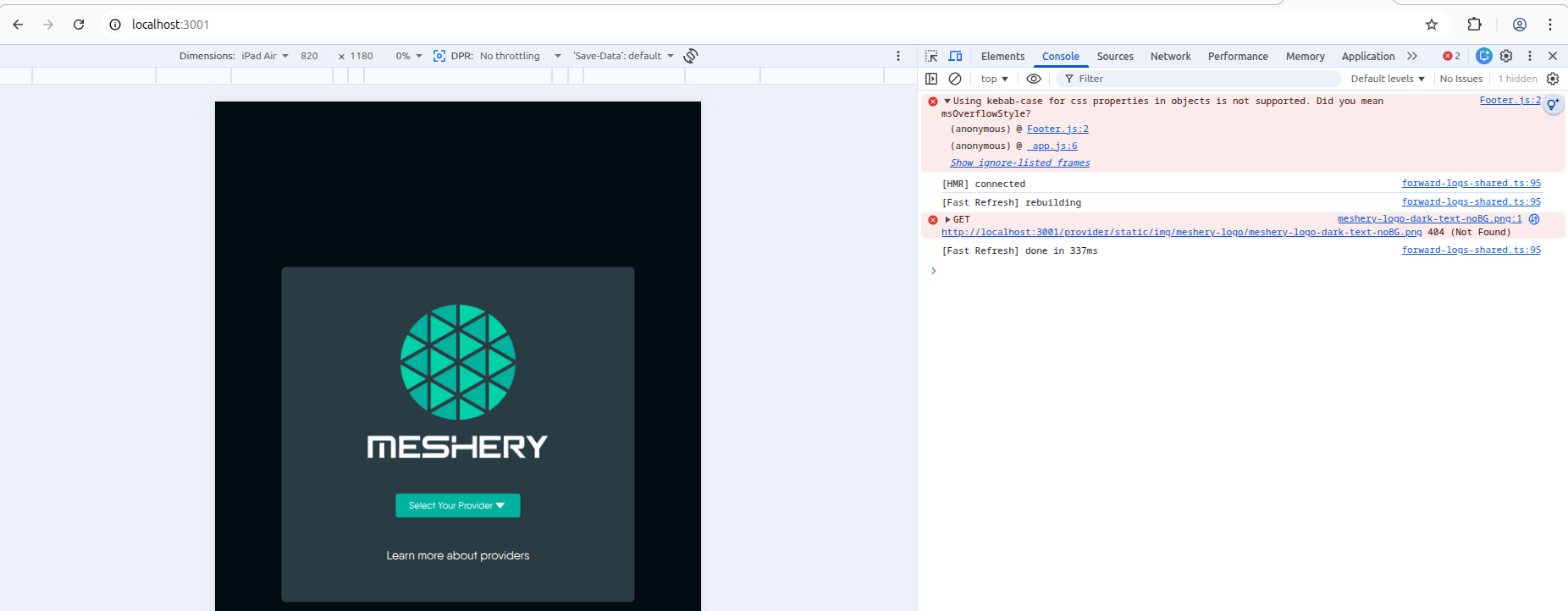
Here are the logs that I got while running make ui
matrixkavi@matrixkavi-ThinkPad-P15-Gen-2i:~/meshery/meshery$ make ui
cd ui; npm run dev; cd ..;

> meshery-ui@1.0.0 dev
> npm run lint:fix && node ui_dev_server.js


> meshery-ui@1.0.0 lint:fix
> eslint --cache --fix --ext .js,.jsx,.ts,.tsx .

> Ready on http://localhost:3000
 GET / 304 in 5.5s (next.js: 5.4s, application-code: 74ms)
[browser] Using kebab-case for css properties in objects is not supported. Did you mean msOverflowStyle?
    at Array.map (<anonymous>)
    at module evaluation (components/AppComponents.tsx:2:1)
    at module evaluation (pages/_app.tsx:2:1)
  1 | import React, { useEffect } from 'react';
> 2 | import { FavoriteIcon, Hidden, Typography, useTheme } from '@sistent/sistent';
    | ^
  3 | import Navigator from './Navigator';
  4 | import subscribeK8sContext from './graphql/subscriptions/K8sContextSubscription';
  5 | import CAN from '@/utils/can'; (<anonymous>)
[browser] [RTK Query] getUserPref failed: SyntaxError: Unexpected token 'P', "Proxy issu"... is not valid JSON
    at <unknown> (store/middleware/rtkErrorMiddleware.ts:24:13)
  22 |       `Request failed (${status || 'unknown status'})`;
  23 |
> 24 |     console.error(`[RTK Query] ${endpointName} failed:`, errorMessage);
     |             ^
  25 |
  26 |     storeApi.dispatch(
  27 |       pushEvent({ (store/middleware/rtkErrorMiddleware.ts:24:13)
[browser] [RTK Query] getSystemSync failed: SyntaxError: Unexpected token 'P', "Proxy issu"... is not valid JSON
    at <unknown> (store/middleware/rtkErrorMiddleware.ts:24:13)
  22 |       `Request failed (${status || 'unknown status'})`;
  23 |
> 24 |     console.error(`[RTK Query] ${endpointName} failed:`, errorMessage);
     |             ^
  25 |
  26 |     storeApi.dispatch(
  27 |       pushEvent({ (store/middleware/rtkErrorMiddleware.ts:24:13)
[browser] Error fetching component for MESHERY: Proxy issue in Meshery-UI
    at MesheryApp.useCallback[loadMeshModelComponent].promises (pages/_app.tsx:213:17)
    at async MesheryApp.useCallback[loadMeshModelComponent] (pages/_app.tsx:217:5)
    at async MesheryApp.useEffect.loadAll (pages/_app.tsx:448:9)
  211 |         }
  212 |       } catch (error) {
> 213 |         console.error(`Error fetching component for ${kind}:`, error);
      |                 ^
  214 |       }
  215 |     });
  216 | (pages/_app.tsx:213:17)
[browser] Error fetching component for KUBERNETES: Proxy issue in Meshery-UI
    at MesheryApp.useCallback[loadMeshModelComponent].promises (pages/_app.tsx:213:17)
    at async MesheryApp.useCallback[loadMeshModelComponent] (pages/_app.tsx:217:5)
    at async MesheryApp.useEffect.loadAll (pages/_app.tsx:448:9)
  211 |         }
  212 |       } catch (error) {
> 213 |         console.error(`Error fetching component for ${kind}:`, error);
      |                 ^
  214 |       }
  215 |     });
  216 | (pages/_app.tsx:213:17)
[browser] Error fetching component for PROMETHEUS: Proxy issue in Meshery-UI
    at MesheryApp.useCallback[loadMeshModelComponent].promises (pages/_app.tsx:213:17)
    at async MesheryApp.useCallback[loadMeshModelComponent] (pages/_app.tsx:217:5)
    at async MesheryApp.useEffect.loadAll (pages/_app.tsx:448:9)
  211 |         }
  212 |       } catch (error) {
> 213 |         console.error(`Error fetching component for ${kind}:`, error);
      |                 ^
  214 |       }
  215 |     });
  216 | (pages/_app.tsx:213:17)
[browser] Error fetching component for GRAFANA: Proxy issue in Meshery-UI
    at MesheryApp.useCallback[loadMeshModelComponent].promises (pages/_app.tsx:213:17)
    at async MesheryApp.useCallback[loadMeshModelComponent] (pages/_app.tsx:217:5)
    at async MesheryApp.useEffect.loadAll (pages/_app.tsx:448:9)
  211 |         }
  212 |       } catch (error) {
> 213 |         console.error(`Error fetching component for ${kind}:`, error);
      |                 ^
  214 |       }
  215 |     });
  216 | (pages/_app.tsx:213:17)
[browser] Error fetching component for GITHUB: Proxy issue in Meshery-UI
    at MesheryApp.useCallback[loadMeshModelComponent].promises (pages/_app.tsx:213:17)
    at async MesheryApp.useCallback[loadMeshModelComponent] (pages/_app.tsx:217:5)
    at async MesheryApp.useEffect.loadAll (pages/_app.tsx:448:9)
  211 |         }
  212 |       } catch (error) {
> 213 |         console.error(`Error fetching component for ${kind}:`, error);
      |                 ^
  214 |       }
  215 |     });
  216 | (pages/_app.tsx:213:17)
[browser] Invalid DOM property `fill-rule`. Did you mean `fillRule`?
[browser] Invalid DOM property `clip-rule`. Did you mean `clipRule`?
[browser] Tag type 'sync' was used, but not specified in `tagTypes`!
    at Array.reduce (<anonymous>)
    at Array.map (<anonymous>)
    at Array.reduce (<anonymous>)
    at <unknown> (store/middleware/rtkErrorMiddleware.ts:38:10)
  36 |   }
  37 |
> 38 |   return next(action);
     |          ^
  39 | };
  40 | (<anonymous>)
[browser] [RTK Query] getConnections failed: SyntaxError: Unexpected token 'P', "Proxy issu"... is not valid JSON
    at <unknown> (store/middleware/rtkErrorMiddleware.ts:24:13)
  22 |       `Request failed (${status || 'unknown status'})`;
  23 |
> 24 |     console.error(`[RTK Query] ${endpointName} failed:`, errorMessage);
     |             ^
  25 |
  26 |     storeApi.dispatch(
  27 |       pushEvent({ (store/middleware/rtkErrorMiddleware.ts:24:13)
[browser] Failed to load telemetry connections: {
  data: 'Proxy issue in Meshery-UI',
  error: `SyntaxError: Unexpected token 'P', "Proxy issu"... is not valid JSON`,
  originalStatus: 500,
  status: 'PARSING_ERROR'
}
    at MesheryApp.useCallback[loadPromGrafanaConnection] (pages/_app.tsx:190:15)
  188 |       });
  189 |     } catch (err) {
> 190 |       console.error('Failed to load telemetry connections:', err);
      |               ^
  191 |     }
  192 |   }, [dispatch, fetchConnections, fetchCredentialById]);
  193 | (pages/_app.tsx:190:15)
[browser] [RTK Query] getOrgs failed: SyntaxError: Unexpected token 'P', "Proxy issu"... is not valid JSON
    at <unknown> (store/middleware/rtkErrorMiddleware.ts:24:13)
  22 |       `Request failed (${status || 'unknown status'})`;
  23 |
> 24 |     console.error(`[RTK Query] ${endpointName} failed:`, errorMessage);
     |             ^
  25 |
  26 |     storeApi.dispatch(
  27 |       pushEvent({ (store/middleware/rtkErrorMiddleware.ts:24:13)
[browser] [RTK Query] getUserPref failed: SyntaxError: Unexpected token 'P', "Proxy issu"... is not valid JSON
    at <unknown> (store/middleware/rtkErrorMiddleware.ts:24:13)
  22 |       `Request failed (${status || 'unknown status'})`;
  23 |
> 24 |     console.error(`[RTK Query] ${endpointName} failed:`, errorMessage);
     |             ^
  25 |
  26 |     storeApi.dispatch(
  27 |       pushEvent({ (store/middleware/rtkErrorMiddleware.ts:24:13)
[browser] [RTK Query] getProviderCapabilities failed: SyntaxError: Unexpected token 'P', "Proxy issu"... is not valid JSON
    at <unknown> (store/middleware/rtkErrorMiddleware.ts:24:13)
  22 |       `Request failed (${status || 'unknown status'})`;
  23 |
> 24 |     console.error(`[RTK Query] ${endpointName} failed:`, errorMessage);
     |             ^
  25 |
  26 |     storeApi.dispatch(
  27 |       pushEvent({ (store/middleware/rtkErrorMiddleware.ts:24:13)
[browser] [RTK Query] getUserProviderRoles failed: SyntaxError: Unexpected token 'P', "Proxy issu"... is not valid JSON
    at <unknown> (store/middleware/rtkErrorMiddleware.ts:24:13)
  22 |       `Request failed (${status || 'unknown status'})`;
  23 |
> 24 |     console.error(`[RTK Query] ${endpointName} failed:`, errorMessage);
     |             ^
  25 |
  26 |     storeApi.dispatch(
  27 |       pushEvent({ (store/middleware/rtkErrorMiddleware.ts:24:13)
[browser] [RTK Query] getOrgs failed: SyntaxError: Unexpected token 'P', "Proxy issu"... is not valid JSON
    at <unknown> (store/middleware/rtkErrorMiddleware.ts:24:13)
  22 |       `Request failed (${status || 'unknown status'})`;
  23 |
> 24 |     console.error(`[RTK Query] ${endpointName} failed:`, errorMessage);
     |             ^
  25 |
  26 |     storeApi.dispatch(
  27 |       pushEvent({ (store/middleware/rtkErrorMiddleware.ts:24:13)
Logs for make server
atrixkavi@matrixkavi-ThinkPad-P15-Gen-2i:~/meshery/meshery$ make server
fatal: No names found, cannot describe anything.
cd server; cd cmd; go mod tidy; \
BUILD="" \
PROVIDER_BASE_URLS="https://cloud.layer5.io" \
PORT=9081 \
DEBUG=true \
USE_GO_POLICY_ENGINE=true \
OTEL_CONFIG= \
PROVIDER_CAPABILITIES_FILEPATH=""  \
APP_PATH="./apps.json" \
KEYS_PATH="../../server/permissions/keys.csv" \
go run main.go error.go;
INFO[2026-04-22T17:15:22+05:30] OpenTelemetry config not set; tracing disabled  app=meshery caller="main.main main.go:138"
INFO[2026-04-22T17:15:22+05:30] Local Provider capabilities are: Not Set      app=meshery caller="main.main main.go:158"
INFO[2026-04-22T17:15:22+05:30] Meshery Server release channel is: Not Set    app=meshery caller="main.main main.go:161"
INFO[2026-04-22T17:15:22+05:30] MESHSYNC_DEFAULT_DEPLOYMENT_MODE is embedded  app=meshery caller="main.main main.go:163"
INFO[2026-04-22T17:15:22+05:30] Meshery Database is at: /home/matrixkavi/.meshery/config  app=meshery caller="main.main main.go:198"
INFO[2026-04-22T17:15:22+05:30] Using kubeconfig at: /home/matrixkavi/.kube   app=meshery caller="main.main main.go:206"
INFO[2026-04-22T17:15:22+05:30] Log level: debug                              app=meshery caller="main.main main.go:207"
INFO[2026-04-22T17:15:22+05:30] extracting Filters from /home/matrixkavi/.meshery/content/filters/binaries  app=meshery caller="github.com/meshery/meshery/server/models.getSeededComponents default_local_provider.go:1808"
INFO[2026-04-22T17:15:26+05:30] Meshery Server listening on: 9081             app=meshery caller="main.main.func6 main.go:442"
INFO[2026-04-22T17:15:37+05:30] session not found                             app=meshery caller="github.com/meshery/meshery/server/models.(*RemoteProvider).GetSession remote_provider.go:753"
INFO[2026-04-22T17:15:37+05:30] [AUTH_FLOW] step=AuthMiddleware action=auth_failed path=/ error=Unable to find "token" cookie in the request. | Short Description: No session found in the request | Probable Cause: User is not authenticated with the selected Provider..Browser might be restricting use of cookies. | Suggested Remediation: Choose a Provider and login to establish an active session (receive a new token and cookie). Optionally, try using a private/incognito browser window..Verify that your browser settings allow cookies.  app=meshery caller="github.com/meshery/meshery/server/handlers.(*Handler).AuthMiddleware.func1 middlewares.go:130"
INFO[2026-04-22T17:15:37+05:30] [AUTH_FLOW] step=InitiateLogin action=start path=/  app=meshery caller="github.com/meshery/meshery/server/models.(*RemoteProvider).InitiateLogin remote_provider.go:486"
INFO[2026-04-22T17:15:37+05:30] [AUTH_FLOW] step=InitiateLogin action=redirect target=https://cloud.layer5.io/login reason=no_token  app=meshery caller="github.com/meshery/meshery/server/models.(*RemoteProvider).InitiateLogin remote_provider.go:533"
INFO[2026-04-22T17:15:45+05:30] For registrant artifacthub imported 150 models, 1326 components, 26 relationships.  app=meshery caller="github.com/meshery/meshery/server/models.RegistryLog seed_models_logs.go:191"
INFO[2026-04-22T17:15:45+05:30] For registrant artifacthub imported 2 models, 10 components.  app=meshery caller="github.com/meshery/meshery/server/models.RegistryLog seed_models_logs.go:191"
INFO[2026-04-22T17:15:45+05:30] For registrant github imported 129 models, 1437 components, 559 relationships.  app=meshery caller="github.com/meshery/meshery/server/models.RegistryLog seed_models_logs.go:191"
INFO[2026-04-22T17:15:45+05:30] For registrant meshery imported 9 models, 1158 components, 4 relationships.  app=meshery caller="github.com/meshery/meshery/server/models.RegistryLog seed_models_logs.go:191"
Is anyone else facing the same issue? I remember running make ui and make server successfully a week or two ago.
My git head is at:
matrixkavi@matrixkavi-ThinkPad-P15-Gen-2i:~/meshery/meshery$ git show HEAD
commit ca2f5e4af627e553f0a0fcb72d4b0ac26e8321cc (HEAD -> master, origin/master, origin/HEAD)
Author: saurabhraghuvanshii <saurabhraghuvanshii@users.noreply.github.com>
Date:   Wed Apr 22 08:12:43 2026 +0000

    [Docs] Updated test report

    Signed-off-by: l5io <ci@meshery.io>

diff --git a/docs/layouts/shortcodes/test-report.md b/docs/layouts/shortcodes/test-report.md
index 5fb7074b84d..6f3de3b6a36 100644
--- a/docs/layouts/shortcodes/test-report.md
+++ b/docs/layouts/shortcodes/test-report.md
@@ -1,6 +1,6 @@
 ### END-TO-END TESTS

-- Testing started at: April 22nd 2026, 7:07:14 am
+- Testing started at: April 22nd 2026, 8:02:46 am

 **📦 Test Result Summary**

@@ -9,7 +9,7 @@
 - ⚠️ 0 flaked
 - ⏩ 3 skipped

-⌛ _Duration: 7 minutes and 44 seconds_
+⌛ _Duration: 7 minutes and 57 seconds_

 **Overall Result**: 👎 Some tests failed.


